

Bulletin 260806 — Electronic Business Services Enrolment - end designation
A new end designation feature is now available for designated users in the Electronic Business Services Enrolment (eBSE) application.
To: All Electronic Business Services Enrolment (eBSE) users
Category: All categories
Written by: Claims Services Branch, Health Programs and Delivery Division
Date issued: September 1, 2026
Bulletin Number: 260806
Overview
eBSE is used for accessing the Medical Claims Electronic Data Transfer (MCEDT), eSubmit, Special Authorization Digital Information Exchange (SADIE) services, and for managing designees.
A new ‘End Designation’ feature has been added to eBSE, allowing designated users to end their own designation to a service provider. This enhancement simplifies the process by eliminating the need for a user to contact the Service Support Contact Centre to action these requests and enables designees to end a designation when it is no longer required.
New End Designation feature
The following steps illustrate how designated users can end their designation in eBSE.
1. Select the Service User
From the Working on Behalf Of list on the Services and Administration page, select the service user whose designation you wish to end.
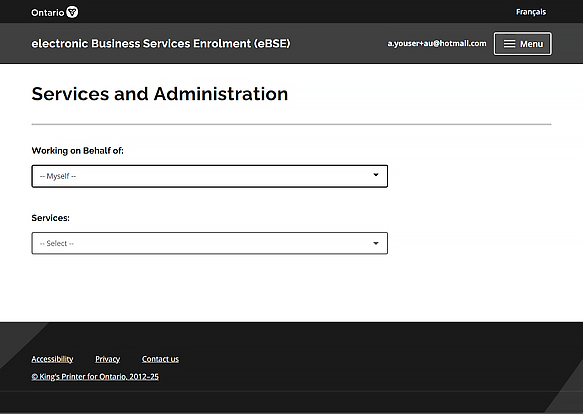
2. Click on End Designation button and click on the confirm button
After selecting the service user, an End Designation button will appear on the screen.
3. Confirmation message that the designation is removed
After the request is processed successfully, a confirmation message is displayed and the designation is removed.
Keywords/Tags
Electronic Business Services Enrolment; eBSE; designation; end designation; designated user; service user; service user; Working on Behalf Of; delegate access.
Contact information
Do you have questions about this INFOBulletin? Email the Service Support Contact Centre or call 1-800-262-6524. Hours of operation: 8:00 a.m. to 5:00 p.m. Eastern Monday to Friday, except holidays.